> ## Documentation Index
> Fetch the complete documentation index at: https://docs.jiekou.ai/llms.txt
> Use this file to discover all available pages before exploring further.
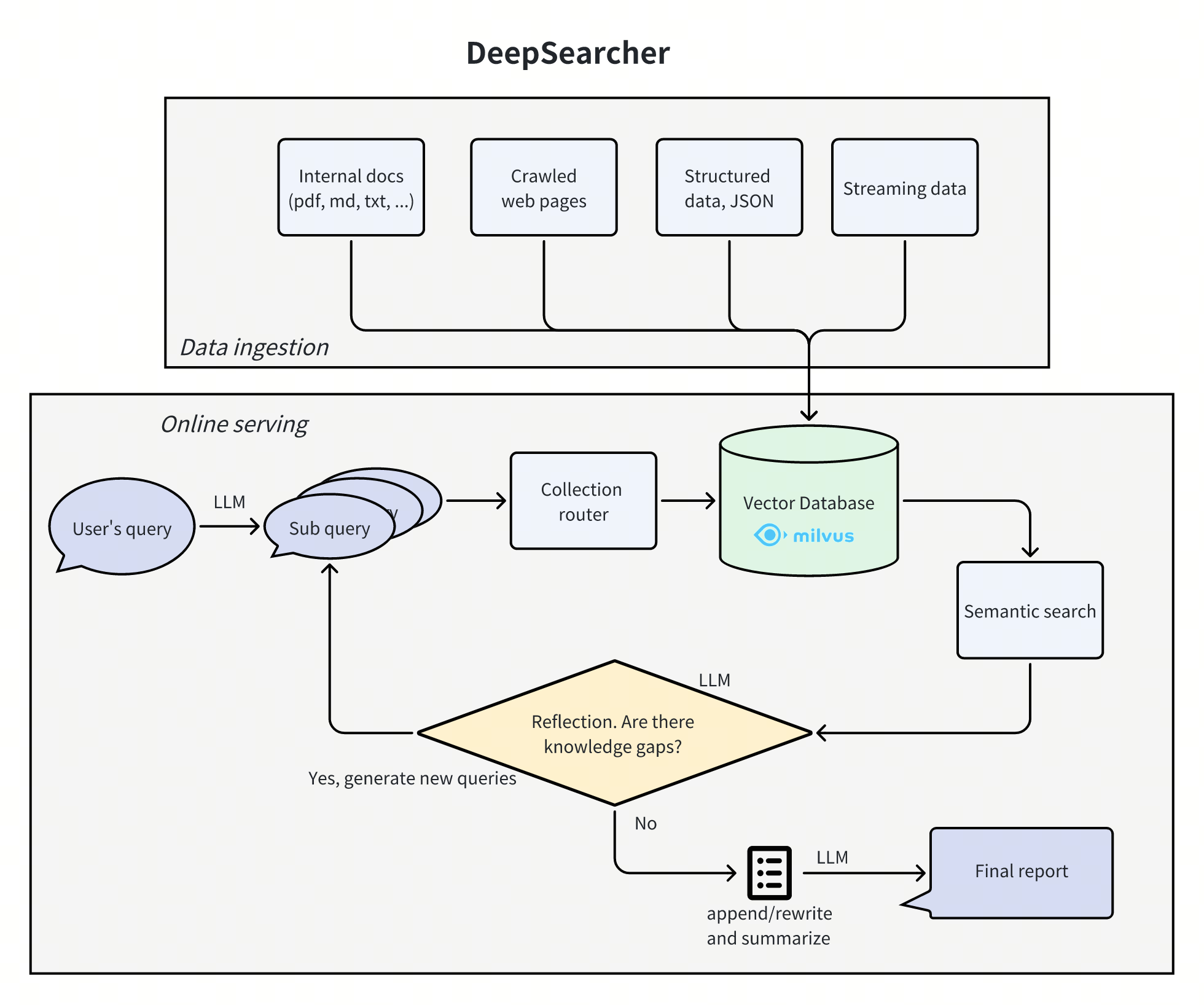
# DeepSearcher
DeepSearcher 结合了尖端的 LLM(OpenAI o1、o3-mini、DeepSeek、Grok 3、Claude 4 Sonnet、Llama 4、QwQ 等)和向量数据库(Milvus、Zilliz Cloud 等),基于私有数据执行搜索、评估和推理,提供高度准确的答案和全面的报告。
**非常适合用于:** 企业知识管理、智能问答系统和信息检索场景。
 ## 1.获取JieKou.AI配置信息
### (1)获取 API 密钥注册
注册并登录 JieKou.AI,注册时填写邀请码【YGHNZ0】可得 \$2 注册奖励。
## 1.获取JieKou.AI配置信息
### (1)获取 API 密钥注册
注册并登录 JieKou.AI,注册时填写邀请码【YGHNZ0】可得 \$2 注册奖励。
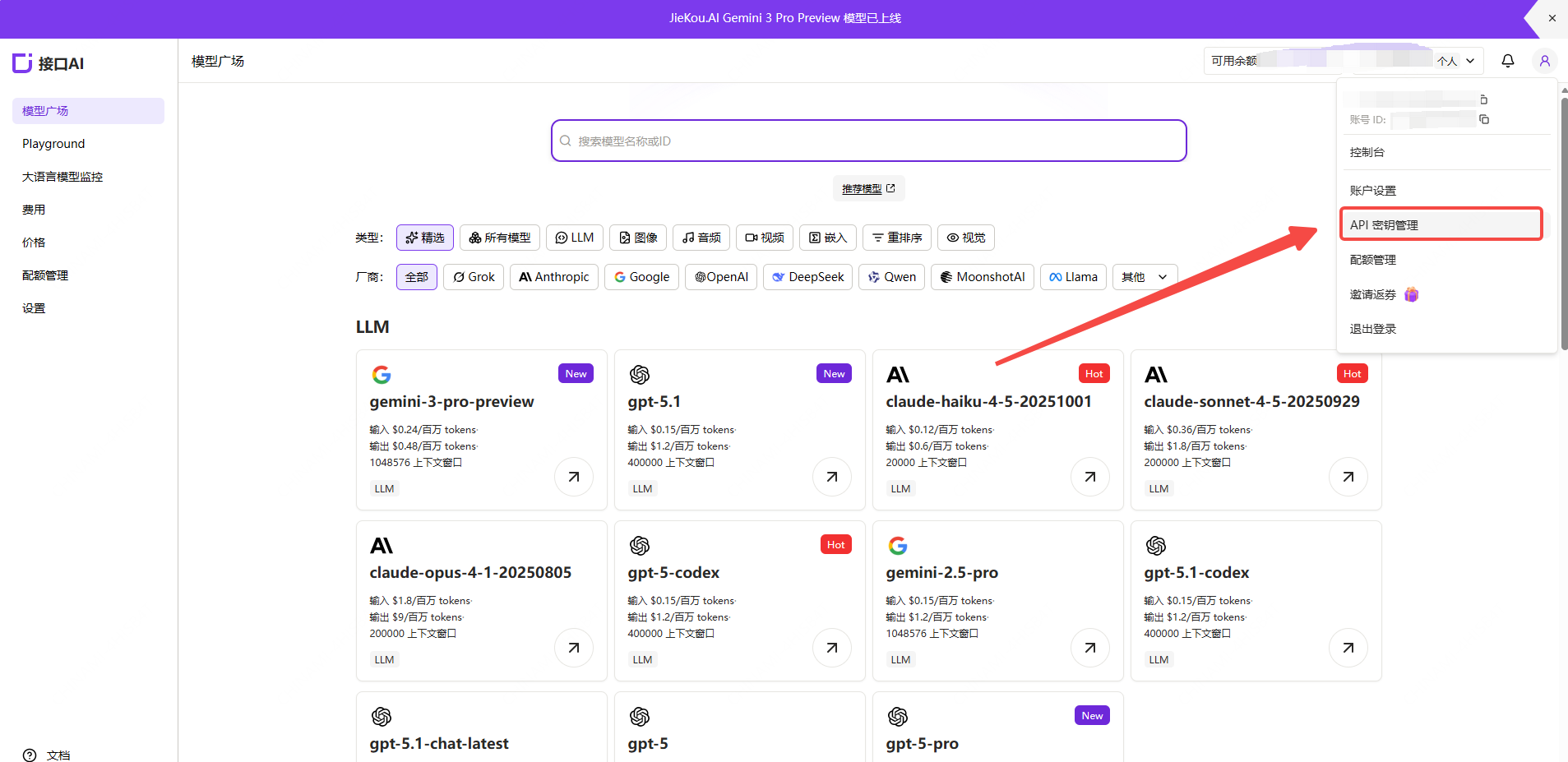
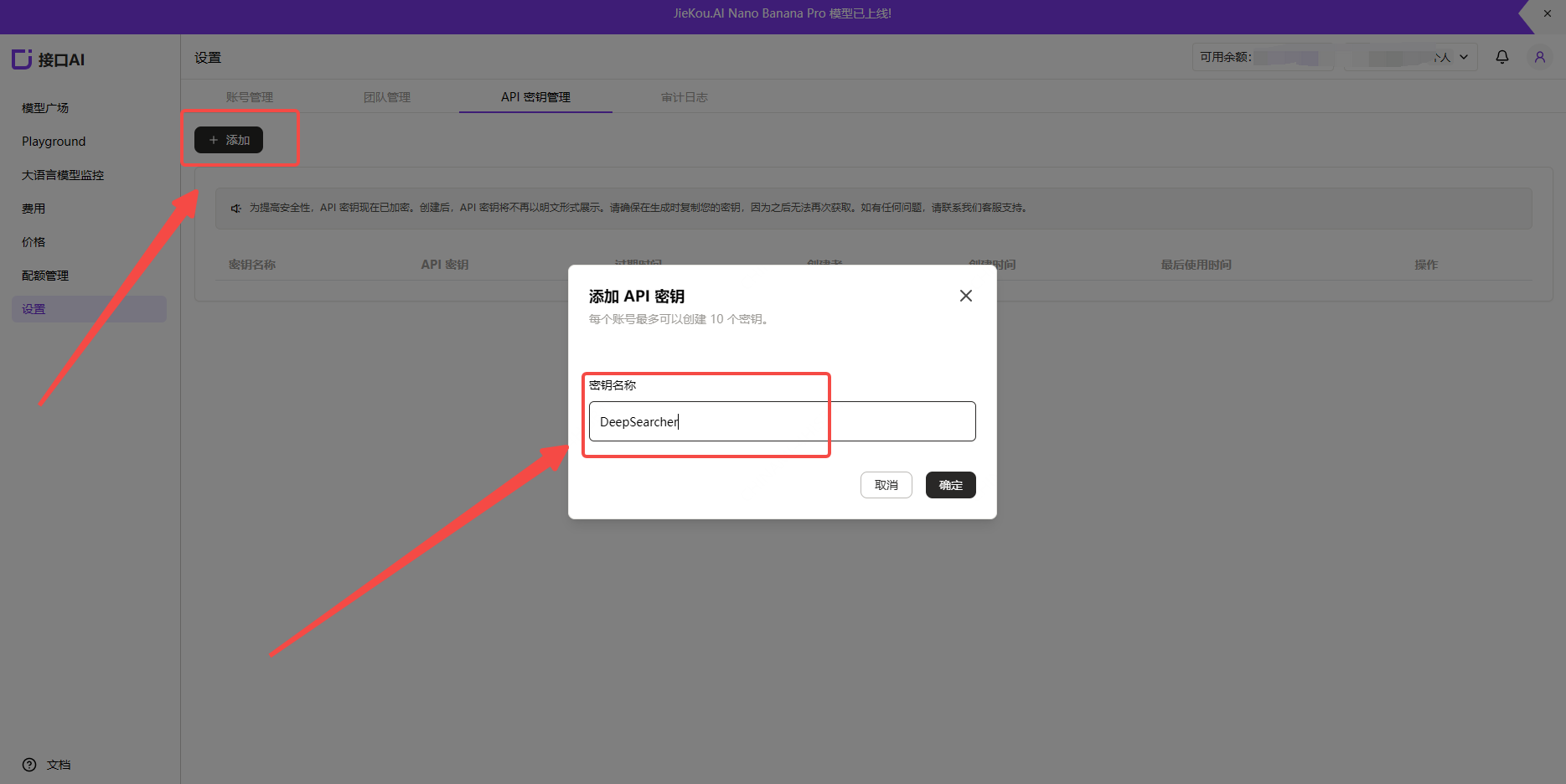
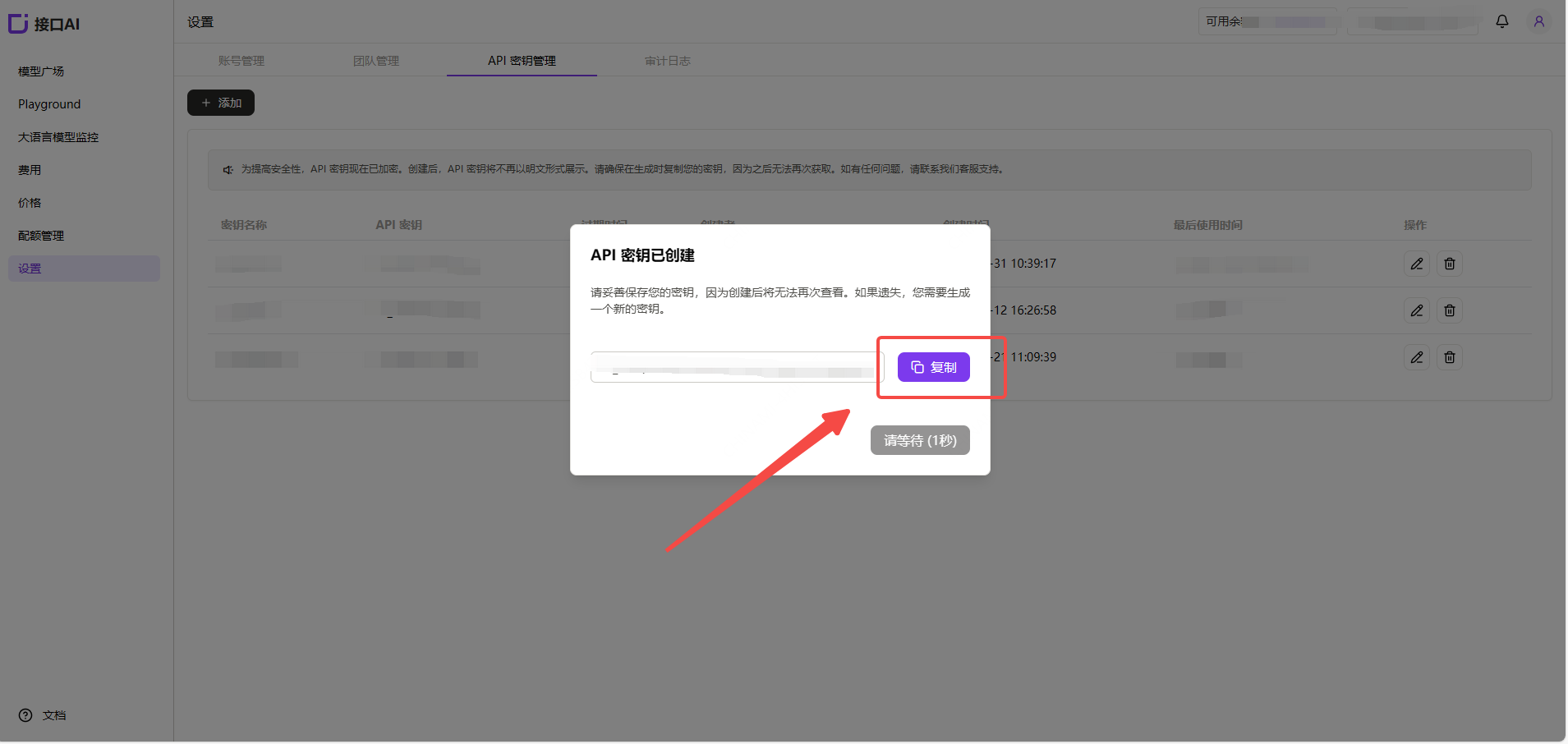
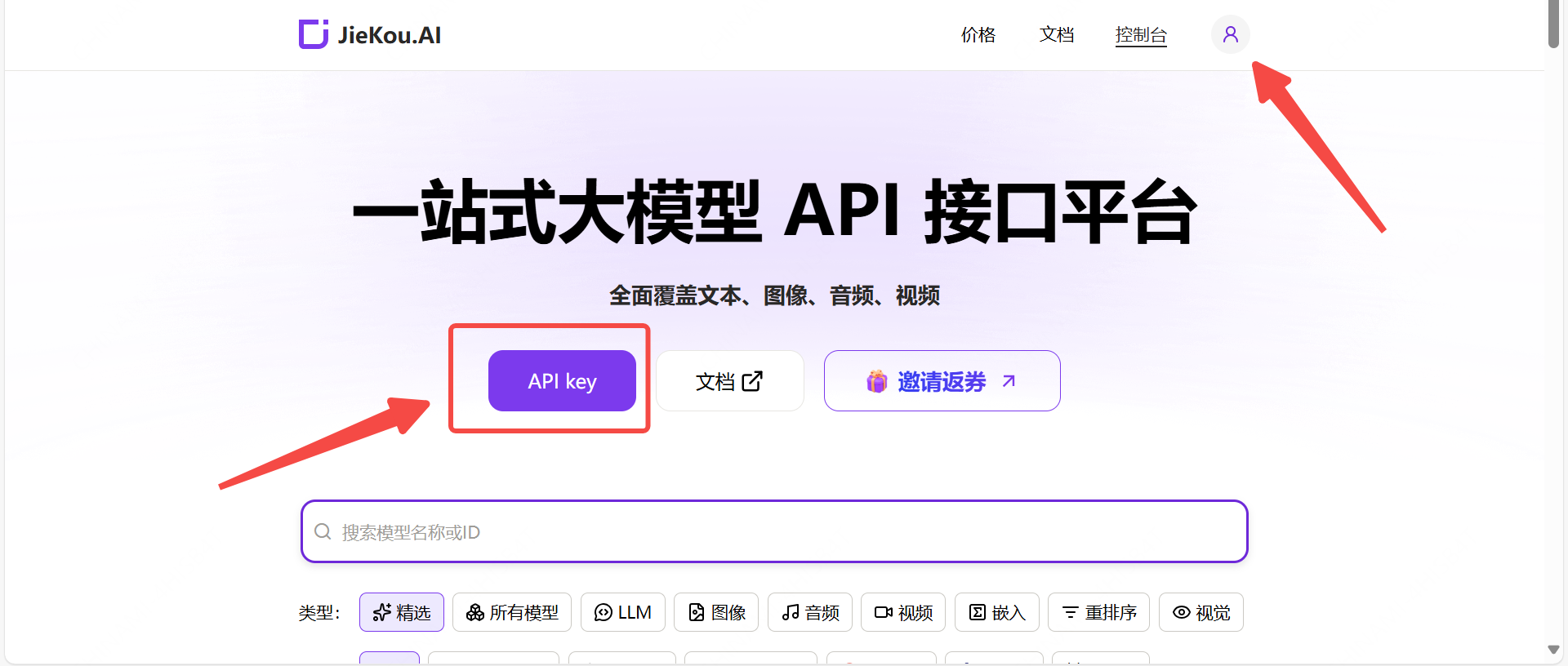 打开【API key】管理页面,点击添加按钮,输入自定义密钥名称,生成API密钥。
 ### (2)生成并保存 API 密钥
!注意:密钥在服务端是加密存储,创建后无法再次查看,请妥善保存好密钥;若遗失需要在控制台上删除并创建一个新的密钥。
### (2)生成并保存 API 密钥
!注意:密钥在服务端是加密存储,创建后无法再次查看,请妥善保存好密钥;若遗失需要在控制台上删除并创建一个新的密钥。
 ### (3)获取需要使用的模型 ID
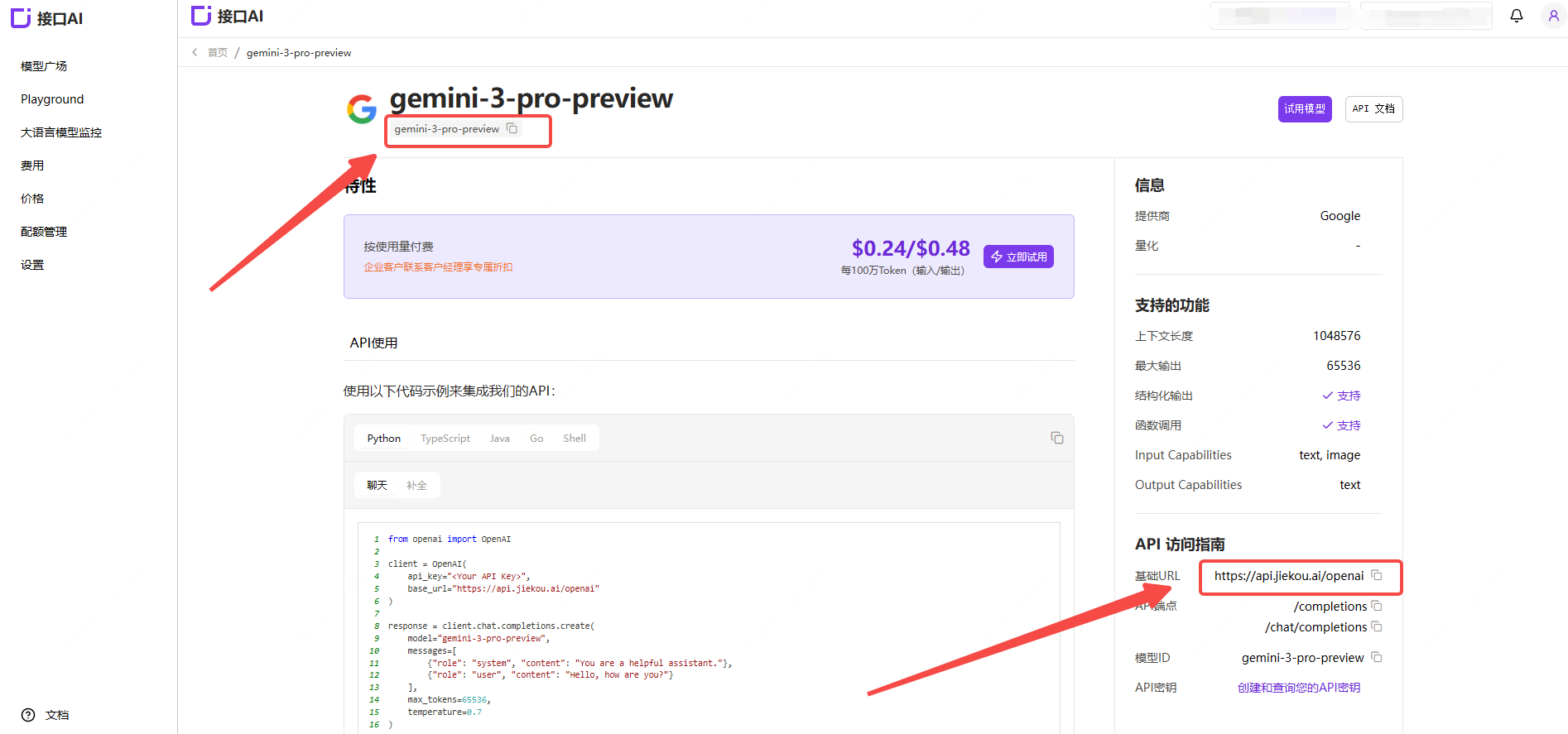
在 JieKou.AI 的模型广场找到想用的模型,复制模型id和基础URL。
### (3)获取需要使用的模型 ID
在 JieKou.AI 的模型广场找到想用的模型,复制模型id和基础URL。
 * Gemini-3-pro-preview
* Gemini-2.5-pro
* Claude-sonnet-4-5
* Gpt-5.1
* Gpt-4o
其他模型ID、最大上下文及价格可参考:[模型广场](https://jiekou.vip/models-console/library?auth_res=success\&is_reg=false)
## 2.安装DeepSearcher
具体安装指南参考:[https://github.com/zilliztech/deep-searcher](https://github.com/zilliztech/deep-searcher)
(1)克隆仓库
```
git clone https://github.com/zilliztech/deep-searcher.git
cd deep-searcher
```
(2)创建一个虚拟环境并激活它
```
#MAKE SURE the python version is greater than or equal to 3.10
python3 -m venv .venv
source .venv/bin/activate
```
(3)安装依赖
```
pip install -e .
```
## 3.修改示例代码以接入 JieKou.AI 模型
示例代码位于 `examples/basic_example.py`。可以使用此示例来运行 DeepSearcher。
(1)配置 API Key
将您刚刚获取的 API Key 设置到本地环境变量`JIEKOU_API_KEY`中。
```
export JIEKOU_API_KEY="您的 JIEKOU API Key"
```
(2)配置LLM与Embedding模型
在示例代码的 `config = Configuration()` 这一行后添加代码
```
config.set_provider_config("llm", "JiekouAI", {"model": "claude-sonnet-4-5-20250929"})
config.set_provider_config("embedding", "JiekouAIEmbedding", {"model": "qwen/qwen3-embedding-8b"})
```
(3)配置需要检索的文件路径与 prompt
从指定的本地路径加载文件,并将其内容存储到的集合中。修改调用 `load_from_local_files` 处的代码。 您可以使用项目提供的 `examples/data/WhatisMilvus.pdf` 文件,也可以使用您自己的文件。 如需执行时删除并重新创建该集合,可将 `force_new_collection` 设置为 `True`
```
load_from_local_files(
paths_or_directory=os.path.join(current_dir, "data/WhatisMilvus.pdf"),
collection_name="milvus_docs",
collection_description="All Milvus Documents",
force_new_collection=True, # If you want to drop origin collection and create a new collection every time,set force_new_collection to True
)
question="Write a report comparing Milvus with other vector databases."
```
(4)运行示例代码在项目根目录下运行:
```
python examples/basic_example.py
```
* Gemini-3-pro-preview
* Gemini-2.5-pro
* Claude-sonnet-4-5
* Gpt-5.1
* Gpt-4o
其他模型ID、最大上下文及价格可参考:[模型广场](https://jiekou.vip/models-console/library?auth_res=success\&is_reg=false)
## 2.安装DeepSearcher
具体安装指南参考:[https://github.com/zilliztech/deep-searcher](https://github.com/zilliztech/deep-searcher)
(1)克隆仓库
```
git clone https://github.com/zilliztech/deep-searcher.git
cd deep-searcher
```
(2)创建一个虚拟环境并激活它
```
#MAKE SURE the python version is greater than or equal to 3.10
python3 -m venv .venv
source .venv/bin/activate
```
(3)安装依赖
```
pip install -e .
```
## 3.修改示例代码以接入 JieKou.AI 模型
示例代码位于 `examples/basic_example.py`。可以使用此示例来运行 DeepSearcher。
(1)配置 API Key
将您刚刚获取的 API Key 设置到本地环境变量`JIEKOU_API_KEY`中。
```
export JIEKOU_API_KEY="您的 JIEKOU API Key"
```
(2)配置LLM与Embedding模型
在示例代码的 `config = Configuration()` 这一行后添加代码
```
config.set_provider_config("llm", "JiekouAI", {"model": "claude-sonnet-4-5-20250929"})
config.set_provider_config("embedding", "JiekouAIEmbedding", {"model": "qwen/qwen3-embedding-8b"})
```
(3)配置需要检索的文件路径与 prompt
从指定的本地路径加载文件,并将其内容存储到的集合中。修改调用 `load_from_local_files` 处的代码。 您可以使用项目提供的 `examples/data/WhatisMilvus.pdf` 文件,也可以使用您自己的文件。 如需执行时删除并重新创建该集合,可将 `force_new_collection` 设置为 `True`
```
load_from_local_files(
paths_or_directory=os.path.join(current_dir, "data/WhatisMilvus.pdf"),
collection_name="milvus_docs",
collection_description="All Milvus Documents",
force_new_collection=True, # If you want to drop origin collection and create a new collection every time,set force_new_collection to True
)
question="Write a report comparing Milvus with other vector databases."
```
(4)运行示例代码在项目根目录下运行:
```
python examples/basic_example.py
```