> ## Documentation Index
> Fetch the complete documentation index at: https://docs.jiekou.ai/llms.txt
> Use this file to discover all available pages before exploring further.
# OpenCode
OpenCode 是一款面向开发者的开源 AI 编程智能体(Coding Agent),主打“终端原生”体验:通过 TUI/CLI 在命令行内完成需求讨论、代码生成、重构、解释与调试等工作流。它强调“模型无关”,可接入 Claude、GPT、Gemini 等多家模型服务,也支持对接本地或 OpenAI 兼容接口,便于在成本、效果与隐私之间自由取舍。OpenCode 还提供可扩展的插件/工具机制与配置体系,能把项目上下文、命令执行等能力纳入自动化流程,适合重度终端用户与希望自定义 AI 编程工作流的团队使用。
# 安装及接入
## 安装
```bash theme={null}
curl -fsSL https://opencode.ai/install | bash
```
其他安装方式见 OpenCode 官方网站:[https://opencode.ai/docs/#install](https://opencode.ai/docs/#install)
## 启动 OpenCode
```bash theme={null}
cd /path/to/project # 进入项目路径
opencode # 启动 OpenCode
```
## 接入 JieKou API
* 全局配置:\~/.config/opencode/opencode.json
* 项目配置:项目根目录下的 opencode.json
(若没有 opencode.json,可以手动创建)
配置如下:
```JSON theme={null}
{
"$schema": "https://opencode.ai/config.json",
"provider": {
"myprovider": {
"npm": "@ai-sdk/openai-compatible",
"name": "JieKou",
"options": {
"baseURL": "https://api.highwayapi.ai/openai/v1"
},
"models": {
"claude-sonnet-4-5-20250929": {
"name": "claude-sonnet-4-5-20250929"
},
"gpt-5.2": {
"name": "gpt-5.2"
},
}
}
}
}
```
配置第三方供应商时,需要注意选择正确的 npm 包:
| **npm 包** | **API 类型** | **适用场景** |
| ------------------------- | ------------------- | ----------------- |
| @ai-sdk/openai-compatible | Chat Completion API | GPT、Claude 等大部分模型 |
| @ai-sdk/openai | Response API | Codex 系列模型 |
**注意:** Codex 模型(如 gpt-5.1-codex)需要使用 @ai-sdk/openai(Response API),其他模型使用 @ai-sdk/openai-compatible(Chat Completion API)。
## 配置 KEY
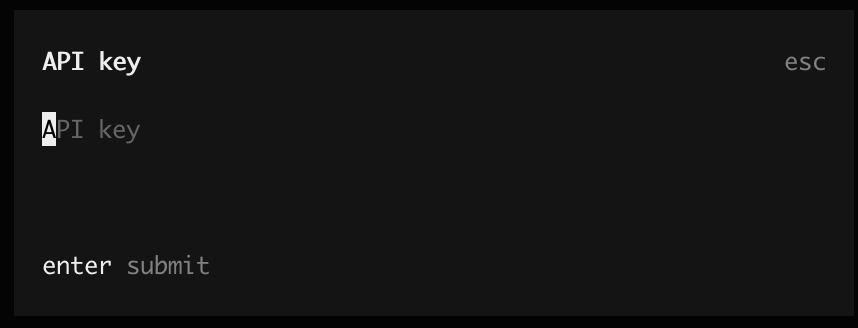
进入 opencode,使用 `/connect` 选择供应商后,填写 API KEY,enter 确定
 ## 开始使用
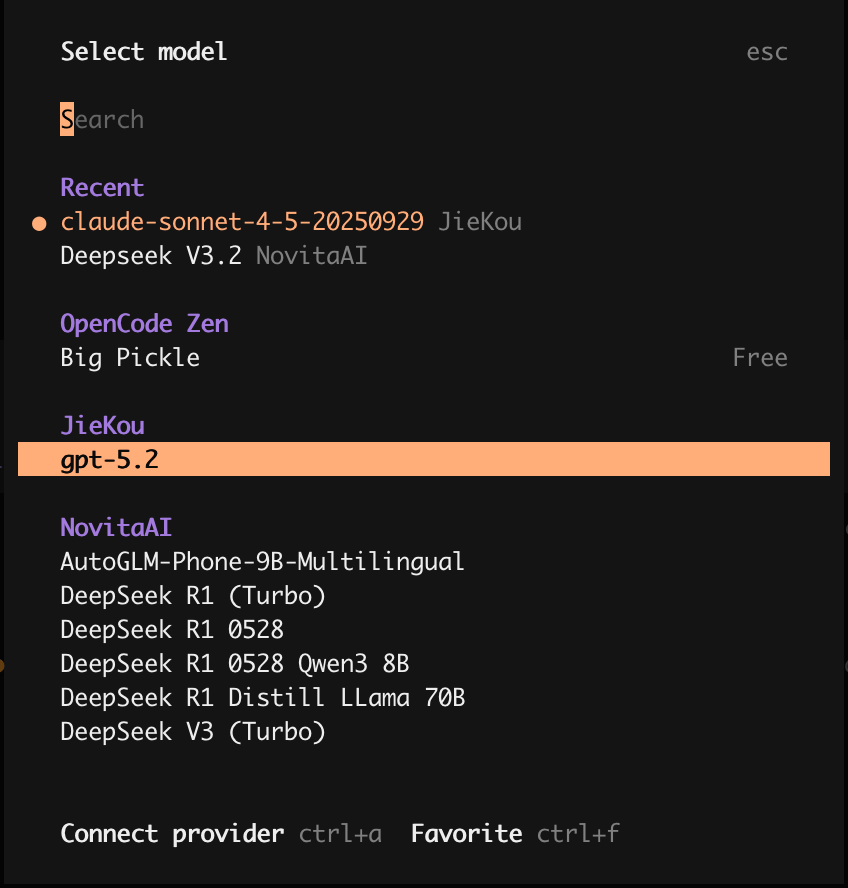
连接供应商后,可使用 `/models` 命令选择模型
## 开始使用
连接供应商后,可使用 `/models` 命令选择模型
 # 其他用法
## 示例:本地 MCP 配置(以计算 MCP 为例)
1. 使用 python + MCP SDK 编写计算器 mcp server 代码,并保存到本地路径中
```python theme={null}
import asyncio
import math
from mcp.server import Server
from mcp.server.stdio import stdio_server
from mcp.types import Tool, TextContent
# Create server instance
server = Server("calculator")
@server.list_tools()
async def list_tools() -> list[Tool]:
"""List available calculator tools."""
return [
Tool(
name="add",
description="Add two numbers",
inputSchema={
"type": "object",
"properties": {
"a": {"type": "number", "description": "First number"},
"b": {"type": "number", "description": "Second number"},
},
"required": ["a", "b"],
},
),
Tool(
name="subtract",
description="Subtract second number from first number",
inputSchema={
"type": "object",
"properties": {
"a": {"type": "number", "description": "First number"},
"b": {"type": "number", "description": "Second number to subtract"},
},
"required": ["a", "b"],
},
),
Tool(
name="multiply",
description="Multiply two numbers",
inputSchema={
"type": "object",
"properties": {
"a": {"type": "number", "description": "First number"},
"b": {"type": "number", "description": "Second number"},
},
"required": ["a", "b"],
},
),
Tool(
name="divide",
description="Divide first number by second number",
inputSchema={
"type": "object",
"properties": {
"a": {"type": "number", "description": "Dividend"},
"b": {"type": "number", "description": "Divisor"},
},
"required": ["a", "b"],
},
),
Tool(
name="power",
description="Raise a number to a power",
inputSchema={
"type": "object",
"properties": {
"base": {"type": "number", "description": "Base number"},
"exponent": {"type": "number", "description": "Exponent"},
},
"required": ["base", "exponent"],
},
),
Tool(
name="sqrt",
description="Calculate square root of a number",
inputSchema={
"type": "object",
"properties": {
"a": {"type": "number", "description": "Number to calculate square root of"},
},
"required": ["a"],
},
),
Tool(
name="modulo",
description="Calculate remainder of division",
inputSchema={
"type": "object",
"properties": {
"a": {"type": "number", "description": "Dividend"},
"b": {"type": "number", "description": "Divisor"},
},
"required": ["a", "b"],
},
),
]
@server.call_tool()
async def call_tool(name: str, arguments: dict) -> list[TextContent]:
"""Handle tool calls for calculator operations."""
try:
if name == "add":
result = arguments["a"] + arguments["b"]
elif name == "subtract":
result = arguments["a"] - arguments["b"]
elif name == "multiply":
result = arguments["a"] * arguments["b"]
elif name == "divide":
if arguments["b"] == 0:
return [TextContent(type="text", text="Error: Division by zero")]
result = arguments["a"] / arguments["b"]
elif name == "power":
result = math.pow(arguments["base"], arguments["exponent"])
elif name == "sqrt":
if arguments["a"] < 0:
return [TextContent(type="text", text="Error: Cannot calculate square root of negative number")]
result = math.sqrt(arguments["a"])
elif name == "modulo":
if arguments["b"] == 0:
return [TextContent(type="text", text="Error: Modulo by zero")]
result = arguments["a"] % arguments["b"]
else:
return [TextContent(type="text", text=f"Error: Unknown tool '{name}'")]
return [TextContent(type="text", text=str(result))]
except Exception as e:
return [TextContent(type="text", text=f"Error: {str(e)}")]
async def main():
"""Run the calculator MCP server."""
async with stdio_server() as (read_stream, write_stream):
await server.run(read_stream, write_stream, server.create_initialization_options())
if __name__ == "__main__":
asyncio.run(main())
```
2. 在 opencode.json 添加本地 mcp
```json theme={null}
{
"mcp": {
"calc_mcp": {
"type": "local",
"command": ["python3", "{your_local_path}/calc_mcp.py"],
"enabled": true
}
}
}
```
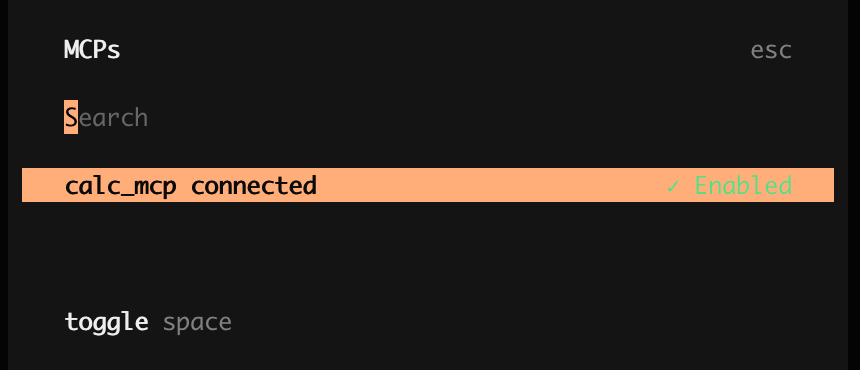
3. 使用 `/mcps` 查看 mcp 连接状态,Enabled 状态时,可令 opencode 调用
# 其他用法
## 示例:本地 MCP 配置(以计算 MCP 为例)
1. 使用 python + MCP SDK 编写计算器 mcp server 代码,并保存到本地路径中
```python theme={null}
import asyncio
import math
from mcp.server import Server
from mcp.server.stdio import stdio_server
from mcp.types import Tool, TextContent
# Create server instance
server = Server("calculator")
@server.list_tools()
async def list_tools() -> list[Tool]:
"""List available calculator tools."""
return [
Tool(
name="add",
description="Add two numbers",
inputSchema={
"type": "object",
"properties": {
"a": {"type": "number", "description": "First number"},
"b": {"type": "number", "description": "Second number"},
},
"required": ["a", "b"],
},
),
Tool(
name="subtract",
description="Subtract second number from first number",
inputSchema={
"type": "object",
"properties": {
"a": {"type": "number", "description": "First number"},
"b": {"type": "number", "description": "Second number to subtract"},
},
"required": ["a", "b"],
},
),
Tool(
name="multiply",
description="Multiply two numbers",
inputSchema={
"type": "object",
"properties": {
"a": {"type": "number", "description": "First number"},
"b": {"type": "number", "description": "Second number"},
},
"required": ["a", "b"],
},
),
Tool(
name="divide",
description="Divide first number by second number",
inputSchema={
"type": "object",
"properties": {
"a": {"type": "number", "description": "Dividend"},
"b": {"type": "number", "description": "Divisor"},
},
"required": ["a", "b"],
},
),
Tool(
name="power",
description="Raise a number to a power",
inputSchema={
"type": "object",
"properties": {
"base": {"type": "number", "description": "Base number"},
"exponent": {"type": "number", "description": "Exponent"},
},
"required": ["base", "exponent"],
},
),
Tool(
name="sqrt",
description="Calculate square root of a number",
inputSchema={
"type": "object",
"properties": {
"a": {"type": "number", "description": "Number to calculate square root of"},
},
"required": ["a"],
},
),
Tool(
name="modulo",
description="Calculate remainder of division",
inputSchema={
"type": "object",
"properties": {
"a": {"type": "number", "description": "Dividend"},
"b": {"type": "number", "description": "Divisor"},
},
"required": ["a", "b"],
},
),
]
@server.call_tool()
async def call_tool(name: str, arguments: dict) -> list[TextContent]:
"""Handle tool calls for calculator operations."""
try:
if name == "add":
result = arguments["a"] + arguments["b"]
elif name == "subtract":
result = arguments["a"] - arguments["b"]
elif name == "multiply":
result = arguments["a"] * arguments["b"]
elif name == "divide":
if arguments["b"] == 0:
return [TextContent(type="text", text="Error: Division by zero")]
result = arguments["a"] / arguments["b"]
elif name == "power":
result = math.pow(arguments["base"], arguments["exponent"])
elif name == "sqrt":
if arguments["a"] < 0:
return [TextContent(type="text", text="Error: Cannot calculate square root of negative number")]
result = math.sqrt(arguments["a"])
elif name == "modulo":
if arguments["b"] == 0:
return [TextContent(type="text", text="Error: Modulo by zero")]
result = arguments["a"] % arguments["b"]
else:
return [TextContent(type="text", text=f"Error: Unknown tool '{name}'")]
return [TextContent(type="text", text=str(result))]
except Exception as e:
return [TextContent(type="text", text=f"Error: {str(e)}")]
async def main():
"""Run the calculator MCP server."""
async with stdio_server() as (read_stream, write_stream):
await server.run(read_stream, write_stream, server.create_initialization_options())
if __name__ == "__main__":
asyncio.run(main())
```
2. 在 opencode.json 添加本地 mcp
```json theme={null}
{
"mcp": {
"calc_mcp": {
"type": "local",
"command": ["python3", "{your_local_path}/calc_mcp.py"],
"enabled": true
}
}
}
```
3. 使用 `/mcps` 查看 mcp 连接状态,Enabled 状态时,可令 opencode 调用